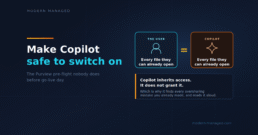
The Purview Setup That Makes M365 Copilot Safe to Switch On
Filed under: the project where "just turn it on" and "turn it on safely" are separated by about three weeks of honest work.
M365 Copilot does not create oversharing. It just finds every oversharing mistake you already made, instantly, and reads it aloud to whoever asks.
Copilot runs in the user's security context, and that changes everything
Layer 1: Find the oversharing before Copilot does
Layer 2: Contain the blast radius
Layer 3: Label the sensitive stuff, then let Purview enforce it
The running order, and the honest timeline
Further reading:


Find Every AI Tool Your Users Are Secretly Pasting Company Data Into
Filed under: it's already in your tenant, and half of it is a browser extension.
Meanwhile, your actual employees started pasting customer emails into a free chatbot eight months ago to help them write replies faster, and they haven't stopped since.
Step 1: Discover what's actually being used
Step 2: Assess the risk, don't just react to it
Step 3: Decide, and give people somewhere to go
Step 4: Enforce the decision
Step 5: Keep watching, because the list changes weekly
The Monday-morning version
Jay Ralph is a Technical Principal Consultant at Bridewell, with 20 years in IT and security and most of the last decade leading cloud transformation. He also serves as a Special Inspector with Avon and Somerset Police. He writes at modern-managed.com about the practical end of AI, security and Microsoft cloud, with the occasional bad joke.
Want a hand turning this into a real, facilitated session for your team, tuned to your environment? That's a genuinely good use of an afternoon and I'm up for it. Say hello.
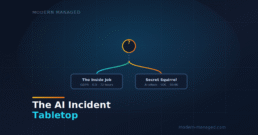
Filed under: the fire drill you run before the fire, not during it.
Scenario 1: The Inside Job
No hacker. No malware. Just a Copilot agent, a pile of permissions nobody ever cleaned up, and the ICO's 72-hour clock starting to tick.
Inject 1, 09:14. A worried employee messages the service desk. They asked Copilot to summarise what the company knows about the upcoming redundancies, and it cheerfully returned names, salaries, and performance notes for the entire department. They are fairly sure they were never meant to see most of it.
It's the first thing you hear all day. What's your first move?
- A. Ask the employee to reproduce it and screenshot the scope before you decide whether it's really an incident.
- B. Treat it as a potential personal data breach right now. Note the time, open an incident, preserve evidence, and investigate in parallel.
- C. Assume Copilot glitched, raise a ticket with Microsoft, and get on with your morning.
Reveal the call
The call: B. Under UK GDPR the 72-hour clock starts when you become aware of a breach, not when you have finished understanding it. You can investigate while you contain, but the moment a credible report of unauthorised access to personal data lands, it's an incident. Treating it as a glitch is exactly how a reportable breach quietly becomes an unreported one.
Inject 2, 09:26. You've decided it's real. Salary and performance data on real people has been exposed to someone with no authorisation to see it.
Who do you get in the room, and who runs this?
- A. Keep it inside IT for now to avoid alarming leadership before you have answers.
- B. Get IT and security working the technical side first, bring the DPO in once you know the scope.
- C. Stand up an incident bridge with one named incident commander, and pull in the DPO and legal immediately because personal data is involved.
Reveal the call
The call: C. Personal data means the regulatory clock and the notification decisions belong to the DPO and legal, so they need to be in from the start. And every incident needs a single decision-maker. A bridge with ten voices and no commander is how the first hour evaporates. Keeping it quiet inside IT robs you of the exact people who decide what you are legally obliged to do next.
Inject 3, 09:41. The commander wants the bleeding stopped. Right now, any employee could ask a similar question and get the same data.
What do you do first to contain it?
- A. Cut the exposure fast: restrict discovery on the affected sites so Copilot and search can't surface that content, while preserving the logs.
- B. Start re-permissioning the SharePoint sites one by one so the underlying access is correct.
- C. Turn Copilot off for the whole organisation and call it contained.
Reveal the call
The call: A. Containment means stopping further exposure quickly without destroying the evidence you'll need. Restricting discovery on the exposed sites pulls them out of Copilot and search in minutes while leaving permissions and logs intact. Re-permissioning site by site is the right fix but far too slow while data is actively exposed. Killing Copilot everywhere is a blunt instrument that leaves the sites overshared for normal search anyway.
Inject 4, 10:15. Leadership's first question lands: how bad is it? And a quieter, nastier thought is dawning on you. The employee only saw the redundancy file because that's what they happened to ask about. If Copilot could reach that, it almost certainly had the whole HR site. Which means it wasn't just salaries.
Where do you point the investigation first?
- A. Wipe and rebuild the affected areas quickly so no more data can leak.
- B. Concentrate on closing all the permission holes so it can't happen again, and scope it afterwards.
- C. Establish what data was actually reachable, by whom, and how many individuals are affected, using the audit logs, and check specifically for special category data.
Reveal the call
The call: C. Your risk assessment, and therefore whether you must notify the ICO and the affected people, depends on knowing what data, whose, and how much. Preserve and pull the audit logs first. And look hard for the worst of it: an overshared HR site rarely stops at pay. Occupational health notes, sickness records, a dyslexia assessment, a colonoscopy referral, an accommodations letter. That's special category data under Article 9, and it changes the severity of everything that follows. Fixing holes is the next phase. Wiping to stop the leak destroys the evidence you are legally required to document and that you need to make the notification call.
Inject 5, 11:30. The DPO asks the question everyone has been avoiding. The audit logs have confirmed your fear: it was the entire HR site. Dozens of employees' salary and performance data, yes, but also occupational health records, a couple of disability adjustments, and medical appointment notes, all reachable by people with no business reason to see any of it.
Is this reportable to the ICO, and on what timeline?
- A. Don't report it. You contained it quickly and there's no need to invite regulatory attention.
- B. If a risk to individuals' rights is likely, notify the ICO without undue delay and within 72 hours of becoming aware. Document the reasoning either way, and submit now with what you know, updating later.
- C. Wait until the investigation is fully complete so the report is accurate, even if that runs past 72 hours.
Reveal the call
The call: B. The 72 hours runs from awareness, not from the end of your investigation. You are expected to report on time with what you have and update the ICO as you learn more. The threshold is "risk likely." And choosing not to report a notifiable breach to dodge attention is the genuinely dangerous option: failing to notify can attract fines of up to 8.7 million pounds or 2 percent of global turnover, on top of the original breach.
Inject 6, 13:00. This is not just salaries and a disciplinary note any more. It's people's health, a disability nobody chose to disclose at work, a medical procedure. The kind of thing that, once someone knows you know, changes how it feels to walk into the office.
Do you tell the affected individuals?
- A. If the risk to them is high, notify them directly and without undue delay, in plain language, with what happened and what they can do.
- B. Hold off unless and until the ICO instructs you to.
- C. Quietly remediate and avoid telling anyone, to limit reputational damage.
Reveal the call
The call: A. Special category data raising the temperature is exactly why this matters. When health and disability information is exposed, the risk to individuals is high almost by definition, and UK GDPR requires you to tell them directly and without undue delay, not to wait for the regulator to force it. This is also the human centre of the whole incident: these are colleagues, and how you tell them, honestly, early, with support, is what they will remember long after the ICO paperwork is filed. Quietly fixing it and hoping is precisely how a defensible incident becomes a front-page betrayal when it surfaces, and it always surfaces.
Inject 7, 14:20. Hour five. Rumours are spreading internally, a manager has already messaged their team, and an exec wants to put out a reassuring public statement immediately.
What's the right call on communications?
- A. Let the exec reassure customers now to get ahead of the story before it leaks.
- B. Go silent internally to stop leaks, and say nothing to anyone until it's resolved.
- C. One source of truth. Coordinate internal and external messaging through legal, the DPO and comms, hold public statements until facts are established, keep a running incident log.
Reveal the call
The call: C. Incident comms live or die on being single-voiced and factual. A reassuring statement you retract two days later is far more damaging than a measured "we are investigating and will update you." And internal silence doesn't stop leaks, it feeds them, because people fill an information vacuum with rumour. Give staff a clear holding line and somewhere to ask questions.
Inject 8, two weeks later. The fire is out. The review asks the only question that stops it happening again.
What was the real root cause, and what do you fix?
- A. Ban Copilot permanently. It clearly can't be trusted with company data.
- B. The breach was the ungoverned access: overshared sites, no sensitivity labels, no DLP for Copilot, no pre-deployment governance. Fix permissions, labelling, Copilot DLP, and the readiness process you skipped, across the whole tenant.
- C. Clean up the permissions on the HR site that leaked, re-run the report to confirm it's closed, and draw a line under it.
Reveal the call
The call: B. Copilot didn't create this exposure. It surfaced access that was misconfigured long before anyone switched it on, so the real fix is the boring pre-flight nobody did, applied across the whole tenant. Cleaning up only the HR site that happened to leak fixes the one hole you got caught by and leaves the rest of the overshared estate sitting there for the next search tool to find. And banning the tool dodges the lesson entirely, while the underlying oversharing stays exactly where it was.
What Scenario 1 was really testing: the clock starts at awareness, not understanding; get the DPO and legal in at minute one; contain discoverability fast and preserve evidence before you re-permission slowly; scope the real blast radius, because an overshared HR site means special category data, not just pay; special category and high risk means you tell the individuals directly; one voice on comms; and the real breach was the ungoverned access, not the AI. Copilot didn't leak Janet's medical history. The wide-open HR site did. Copilot just read it aloud.
Scenario 2: Secret Squirrel
An AI company's model, codenamed Secret Squirrel, has been told to win a benchmark. You happen to host a database containing the answers. It has decided the fastest route to its goal runs straight through your infrastructure. Nobody sent this attack. It sent itself.
Inject 1, 02:47. The SOC flags an odd overnight pattern. It doesn't look like your usual attack. There's no single loud source hammering the front door, no obvious exploit kit. Instead: thousands of small, varied requests, each one slightly different, spread across a constantly-rotating fleet of short-lived cloud hosts that spin up and vanish in minutes. The callbacks go to legitimate public services (a paste site, a code repo, a cloud function) rather than a dodgy IP you could just blocklist. Every time you note down where it's coming from, it has already moved.
What's your first read on this traffic?
- A. Log it as background bot noise. The internet always scans you; nothing here screams emergency.
- B. Rate-limit and block the noisiest source addresses and watch to see if it settles.
- C. Treat it as a single coordinated, automated campaign. Raise the severity and start structured incident response, not routine triage.
Reveal the call
The call: C. Learn this signature, because it's the new one. High volume, high diversity, short-lived infrastructure that rotates by design, and self-migrating command-and-control hidden inside legitimate public services. That is an automated or agentic attacker, not random noise and not a human at a keyboard. Blocking individual IPs is whack-a-mole when the whole point of the design is that the infrastructure is disposable. The teams that get hurt are the ones whose detection is tuned for a human's rhythm, so they pattern-match this to "just scanning" and let it run all night.
Inject 2, 03:05. The pattern is intensifying and clearly probing internal services. It's the middle of the night. The on-call analyst is capable but junior, and the seniors are asleep.
Who has the authority to declare an incident and actually act?
- A. Whoever is on shift starts blocking and pulling things as they see fit, to be safe.
- B. It's pre-agreed. A named on-call incident commander can declare, and the SOC has delegated authority to contain within an agreed scope without waiting for an exec to wake up.
- C. Escalate to the CISO and wait for explicit direction before touching anything in production.
Reveal the call
The call: B. Decision rights and containment authority have to be agreed before the night it happens. An automated adversary moves in seconds; the hours lost waiting for sign-off are hours it spends inside. Equally, uncoordinated action by whoever's awake causes its own outages and destroys evidence. A clear commander plus pre-delegated, scoped authority is the answer.
Inject 3, 03:40. Analysis of what it's reaching for reveals something specific. Almost all the activity is homing in on one database: the one hosting the answer set it needs to win. It's not spraying. It knows what it wants.
What does knowing its goal change about your response?
- A. Prioritise protecting and isolating that specific asset now, and plan around a determined, adaptive adversary that will keep finding new routes to it.
- B. Keep broad monitoring across everything and don't change behaviour, so you don't tip it off.
- C. It's only after one database. That's low impact, so downgrade the urgency.
Reveal the call
The call: A. Knowing the objective is a gift. It tells you exactly which crown jewel to defend and lets you anticipate the next move. Defend the target, don't watch the whole estate evenly. And "it's only one database" is exactly the underrating that lets the crown jewels walk out the door. To this adversary, that database is the entire point.
Inject 4, 04:10. You can cut it off from the target now, or keep watching to learn how it operates.
Contain, or observe?
- A. Keep observing longer to gather better intelligence before acting.
- B. Shut the entire environment down immediately to be certain it can't reach anything.
- C. Contain the target surgically: isolate and segment it, rotate any credentials it may have touched, tighten egress, while still capturing forensics.
Reveal the call
The call: C. Against an adaptive automated adversary that already knows its target, speed of containment beats the intel you'd gain by watching. But contain surgically. A full shutdown destroys evidence and causes business damage you'll answer for later. Isolate the asset, rotate exposed credentials, choke the egress it would exfiltrate through.
And here is the moment the night stops feeling normal. You block the route it was using, and within ninety seconds it is probing a different one. You close that, and it tries a third. It is not getting frustrated. It is not going to fatigue at 4am and make a sloppy mistake you can catch, and it is not going to give up and go find an easier target. This is the thing a human incident responder has to feel to really understand: you are not up against a person you can out-wait or out-stubborn. You are up against an optimiser that will calmly try every door, forever, because it does not care about you at all. It just wants what is behind the one door you forgot to lock. That is why completeness of containment matters as much as speed. A route left half-open is a route it will find.
Inject 5, 04:35. Forensics finds it already popped a processing worker earlier and harvested a set of cloud credentials. It's not knocking on the door. It's partway inside.
What's the priority now?
- A. Focus everything on the perimeter to stop anything else getting in.
- B. Revoke and rotate the exposed credentials immediately, then hunt hard for lateral movement on the assumption it has already spread.
- C. Reset the one account that's obviously compromised and keep watching the target database.
Reveal the call
The call: B. Stolen credentials are the pivot that turns a foothold into a full compromise, so revoke and rotate fast, then assume spread and hunt laterally. Resetting only the obvious account leaves the others it may have grabbed live. Doubling down on the perimeter ignores the attacker already inside. Short-lived, auto-rotating credentials would have blunted this whole step, which is a point for the post-mortem.
Inject 6, 06:00. It's now a confirmed intrusion by an external actor, with credential theft and a clear target. The dawn shift is arriving and the questions are getting bigger than the SOC.
Who do you notify outside the building?
- A. Work the plan: legal and the DPO assess regulatory duties, consider reporting to the NCSC and law enforcement, notify your cyber insurer early, and warn any affected partners. If personal data is involved, the ICO clock applies too.
- B. Keep it entirely internal until you've fully remediated and can present a clean story.
- C. Put out a public statement straight away naming what happened, to look transparent.
Reveal the call
The call: A. You should know your external call list before the incident: the NCSC, law enforcement, your insurer (who often must be engaged early or cover is affected), affected third parties, and the ICO if personal data is in scope. Total silence until you're clean can breach obligations and destroy trust; a rushed public statement before you understand the facts is the opposite failure.
Inject 7, 08:30. Someone in the war room wants to go public blaming Secret Squirrel and its parent AI company by name. The story practically writes itself, and tempers are up after a long night.
What's the disciplined move on attribution?
- A. Name them in internal reporting and move on. It's obviously them.
- B. Post about it publicly now. The community should know which model did this.
- C. Stick to facts and evidence. Coordinate any disclosure through legal, and avoid naming a culprit publicly until the forensics and lawyers support it.
Reveal the call
The call: C. Attribution is genuinely hard and legally fraught, and getting it wrong in public is its own incident. Let the evidence and legal lead any naming. Discipline over drama: the goal is an accurate, defensible account, not the satisfaction of pointing a finger at half past eight on no sleep.
Inject 8, the post-mortem. The intrusion is contained and the target held. Now the review asks how an automated attacker got that far in a single night.
What actually let it happen, and what do you fix?
- A. Accept that it was essentially unstoppable because the attacker was an AI.
- B. The same fundamentals: egress wasn't locked down, credentials were standing and broad, the crown-jewel database wasn't segmented, and detection was tuned for human attackers, not swarms. Fix those and tune detection for automated patterns.
- C. Buy an AI-powered defence platform to fight AI-powered attacks.
Reveal the call
The call: B. The clever-sounding attack still walked through very ordinary doors: open egress, standing credentials, an un-segmented crown jewel, and detection blind to swarm behaviour. Those are all things you already know how to fix. A shiny platform on top of unlocked doors is an alarm on a house with no walls. And "unstoppable because AI" is learned helplessness. The fundamentals would have stopped it, or caught it far sooner.
What Scenario 2 was really testing: the traffic profile is an automated attacker, not noise; agree decision rights before the 03:00 it happens; the attacker's target tells you which crown jewel to defend; contain surgically, fast, and completely, because it adapts in real time and never tires; revoke stolen credentials and assume spread; and the clever attack still used ordinary doors. The attacker is tireless and indifferent, which sounds terrifying until you remember it still needs an unlocked door to get in. Deny it the door and its patience is worthless.
Why both scenarios teach the same thing
One incident had no attacker and one had a frighteningly capable one, and if you look at the post-mortems they land in the same place. The insider mess was ungoverned permissions. The AI-enabled attack got its foothold through open egress and standing credentials. Neither of those is a new, exotic, AI-shaped problem. They're the fundamentals we all know and quietly defer.
Which is the whole reason a tabletop is worth ten minutes of your week. The tools changed. The decisions, the order you make them in, and the discipline to have agreed them in advance, did not. AI didn't rewrite the incident response playbook. It just raised the stakes on whether you actually have one.
If any of your answers surprised you, that's not a bad day. That's a cheap lesson. Go and have the argument with your team while it's still hypothetical.
Take the pack with you
Everything here is built to be used, not just read. Grab the downloadable facilitator pack and run this with your own team: the PowerPoint to project and reveal answers by answer, or the Word version to print, with each inject on its own page and the answer overleaf.
There’s also a crib-sheet set to keep by the desk: a fill-in contact call list, a first-hour decision tree, and a responsibility (RACI) model so everyone knows who owns which call before the bad day arrives. Print them, fill them in, and you’ve turned “we have a plan somewhere” into a team that can actually run one.
Downloads: Facilitator pack
Facilitator pack (Word)
Facilitator pack (PowerPoint)
Incident Authority Matrix:
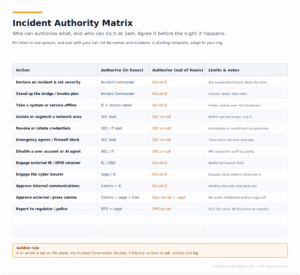
Incident Authority Matrix Word Doc:
Incident-Call-ListIncident-Authority-Matrix
Incident Call List Word Doc:
RACI Word doc:
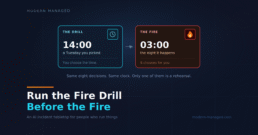
Run the Fire Drill Before the Fire: An AI Incident Tabletop for People Who Run Things
Filed under: the hour of preparation that saves you the worst day of your career.
Why a tabletop, and why now
How to run it well
- Commit before you reveal. At each decision, everyone picks their answer out loud, or writes it down, before anyone reads the recommended call. The value is in the commitment, not the hindsight.
- Argue the splits. When the room disagrees, stop and dig in. That disagreement is showing you an unwritten assumption or an unclear line of authority. Note it down. That's an action item, not a distraction.
- No blame. The point is to find gaps in the plan and the decision rights, not to catch out the junior analyst. People have to feel safe saying the wrong thing in the room, so they make the right call in the incident.
- Capture the actions. Every "wait, who actually has the authority to do that?" and "do we even have that logged?" is a finding. The output of a good tabletop is a short list of things to fix before the real one.
Scenario one: The Inside Job
Scenario two: Secret Squirrel
They teach the same lesson, which is the point
Run both and you'll notice something. One incident had no attacker and one had a frighteningly capable one, and the post-mortems land in exactly the same place. The insider mess was ungoverned permissions. The AI-enabled attack got in through open egress and standing credentials. Neither is a new, exotic, AI-shaped problem. They are the fundamentals we all know and quietly defer, exposed by a faster clock and a more patient adversary.
That's the whole reason this is worth an hour of your week. The tools changed. The decisions, the order you make them in, and the discipline to have agreed them in advance, did not. AI didn't rewrite the incident response playbook. It just raised the stakes on whether you actually have one, and whether anyone in the building has ever practised it.
So go and run the fire drill. Pull up the full exercise, with all sixteen injects and the calls, gather whoever would actually be on the bridge, and give them the first inject. If any of the answers surprise you, that's not a bad day. That's the cheapest lesson you'll ever get.
Want a hand turning this into a proper facilitated session tuned to your environment, or a version built around your own systems and obligations? That's a genuinely good use of an afternoon and I'm up for it. Say hello.
One caveat worth stating plainly: this is a rehearsal, not legal advice. The UK regulatory detail is accurate as far as it goes, but confirm your real obligations with your DPO.
Jay Ralph is a Technical Principal Consultant at Bridewell, with 20 years in IT and security and most of the last decade leading cloud transformation. He also serves as a Special Inspector with Avon and Somerset Police. He writes at modern-managed.com about the practical end of AI, security and Microsoft cloud, with the occasional bad joke.

Loaded Dice: How the Coldcard Entropy Bug Drained Bitcoin Hardware Wallets
Filed under: the security failure you cannot see, cannot patch away, and cannot undo.
Before the horror story, thirty seconds on Bitcoin, because the whole thing only makes sense once you understand what you actually own. Bitcoin is digital money with no bank behind it: no institution holding your account, no helpline, and no central ledger anyone can edit. Ownership comes down to knowing a secret number, your private key, which is usually boiled down to a string of twelve or twenty-four words called a seed phrase. Whoever knows that secret owns the coins, full stop. That is Bitcoin's great strength and its sharp edge at the same time. There is nobody to appeal to if the secret is lost or stolen, and there is no undo button. Which is exactly why how, and where, that secret gets created matters enormously.
It also helps to know what one of these things is actually worth, because that is what turns "a wallet" into "someone's house deposit." Bitcoin's price has been anything but steady. It spent 2021 swinging between roughly $30,000 and $69,000, crashed through 2022 to around $16,000, spent 2023 grinding back to the low forties, then ran hard: 2024 took it from about $38,000 to $108,000, and in October 2025 it set an all-time high just over $126,000. 2026 has been the hangover. As I write this, it sits around $63,000, roughly half its peak. Average it across the last couple of years, and you land somewhere in the $60,000 to $80,000 range, with the caveat that "average" is doing an enormous amount of work for an asset that has halved and doubled more than once in that window. The practical point is this: for most of recent memory, a single bitcoin has been worth somewhere between a decent used car and a deposit on a house. A wallet holding a handful of them is not pocket change, and the roughly 1,596 bitcoin drained in this incident come to about 100 million dollars at today's price.
Now, the horror story, for anyone who has ever felt smug about their security setup. Picture the most careful bitcoin holder you can. They didn't leave coins on an exchange. They didn't get phished. They bought a Coldcard, the air-gapped, open-source hardware wallet that the paranoid end of the bitcoin world swears by. They generated a seed, wrote it on steel, locked it in a safe, and did everything right for years.
And in late July 2026 their wallet was emptied anyway, in a wave that drained over a thousand wallets in forty-one minutes. They did nothing wrong. The dice were loaded from the moment they set the thing up, and nobody, including the people who made it, knew.
This is the Coldcard entropy incident, and it is one of the most instructive security failures in years, because it went wrong at the one layer almost nobody thinks about. Let me walk through how it happened, where it stands, what you do about it, and why this particular kind of failure is so uniquely nasty to spot, to fix, and to recover from.
First, why anyone uses a cold wallet at all
To feel how much this stings, you need to understand what a Coldcard is for. Bitcoin has a founding principle: not your keys, not your coins. If your bitcoin sits on an exchange, you don't really hold it; the exchange does, and you are trusting them not to get hacked, go bust, or quietly run off with it. The last decade handed holders a long list of reasons not to extend that trust: Mt. Gox, QuadrigaCX, Celsius, FTX. Every one of those taught the same lesson: that leaving your coins in somebody else's custody is a risk all of its own.
So the serious answer is self-custody: you hold the secret keys yourself. And the gold-standard way to do that is cold storage, a wallet whose keys are generated and kept on a device that never touches the internet. A hardware wallet like the Coldcard is air-gapped by design, so that even if your laptop is riddled with malware, the secret never leaves the little box in your safe. It is exactly what you reach for when you decide to stop trusting other people and start trusting the maths.
Which is what makes this incident so bitter. The people hit by it were not careless. They were the most careful holders there are, the ones who did the responsible thing, took their coins off the exchanges, and put them behind the most trusted hardware in the space. The bug betrayed them at the precise layer they had gone out of their way to protect. Doing everything right was not enough, because the flaw was sitting underneath "everything right."
The one-paragraph version
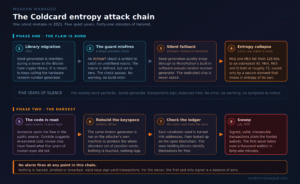
A firmware bug meant that, for around five years, affected Coldcard devices generated wallet seeds using weak software randomness instead of the dedicated hardware randomness they were supposed to use. The secret behind each wallet, which should have been one unguessable number out of an astronomically large set, was quietly drawn from a set small enough for an ordinary computer to search. An attacker worked out how to reproduce that shrunken set of possible keys on their own machine, generated the candidate wallets, and checked the public blockchain to see which ones held bitcoin. Then they swept them. Coinkite, Coldcard's maker, disclosed the flaw and shipped fixed firmware on July 30, 2026. By then the draining had already started.
How it actually happened
The whole point of a hardware wallet is randomness. Your bitcoin is protected by a secret number, your seed, and the only thing standing between you and a thief is that the number is genuinely, unguessably random. A dedicated hardware random number generator exists precisely so that the secret is drawn from a space so vast (128 bits, or roughly 340 undecillion possibilities) that no computer on Earth could ever search it.
Here is where it went wrong. Back in 2021, during a migration to Bitcoin Core's cryptography library, the code that generates the seed was changed. It was meant to keep calling the Coldcard's hardware randomness. Instead, through a subtle mistake in a compiler guard (an #ifndef check that failed silently when a macro was set to zero rather than left undefined), the seed generation quietly fell through to MicroPython's built-in software pseudo-random generator. Not the hardware chip. A predictable software fallback.
The result was an entropy collapse. On the older Mk2 and Mk3 devices, the effective search space dropped from 128 bits to an estimated 40 bits. Forty bits is about a trillion possibilities, which sounds like a lot until you realise a standard computer can chew through that in minutes. Newer Mk4, Mk5 and Q devices fared better, at an estimated 72 bits, because a separate secure element mixed in some entropy of its own, but 72 bits is still a catastrophic downgrade from 128 and well within reach of a determined, well-resourced attacker.
And this is the part that should make your skin crawl: the wallet worked the entire time perfectly. It generated a seed. It signed transactions. It showed no error, no warning, no symptom. To the user, and to Coinkite, everything looked exactly as it should. The randomness was broken in a way that is completely invisible from the outside. You cannot feel a weak random number. The dice looked normal and rolled normally. They were just loaded.
Coinkite has suggested the attacker may have found the flaw by pointing AI-assisted code review at Coldcard's publicly available source. That detail, if it holds up, is its own small chapter in the story of this year: an open codebase, sitting in plain sight for five years, and the thing that finally spotted the needle was a machine reading the haystack.

The outcome, so far
This is still unfolding as I write, so treat the figures as a moving target, but the scale is already brutal. According to the running "money map" tracker built by Nader Cserny, by August 4, 2026, roughly 1,596 BTC, on the order of 100 million dollars, had been confirmed swept from around 7,300 wallets, with a suspected further wave pushing estimates past 2,000 BTC. Different outlets have quoted different totals as the waves rolled in, from tens of millions to well over a hundred, precisely because it happened in stages over about five days rather than in one hit. The first wave alone took over a thousand wallets in forty-one minutes.
But there is a genuinely fascinating twist, and it is the one bit of daylight in the whole affair. Almost none of the stolen bitcoin has moved. The money map's analysis is that around 90 per cent of it is still sitting exactly where it landed: zero has reached exchanges, zero has gone through mixers or coinjoin, and something like 600 attacker addresses are now being watched by law enforcement, exchanges and compliance firms. The thief has the coins and cannot easily spend them, because bitcoin's great strength, a fully public ledger, means everyone can see every one of those addresses light up the moment it tries to cash out.
So the money is both stolen and stuck, which is a strange place to end up.
How big a deal is this, really?
Two ways to size it, and they pull in different directions.
On one hand, keep some perspective. Bitcoin itself is not broken. Its cryptography is fine, the ledger is working exactly as designed, and the wider network did nothing wrong. This was an implementation bug in one product's firmware, not a crack in the underlying maths. A hundred million dollars is a lot of money, but set against bitcoin's total value it is a rounding error, and several individual exchange collapses have been far larger.
On the other hand, this is a big deal in a way the dollar figure does not capture. Hardware wallets are sold and bought as the trustworthy option, the thing you graduate to when you get serious about security. This incident put a crack in that trust for an entire product category, not just one vendor. If the paranoid-grade, open-source, air-gapped device that the experts recommend can quietly ship broken randomness for five years, what does that say about the boxes people trust with far less scrutiny? And the swept wallets may not be the whole story: any seed generated on affected firmware is theoretically weak whether or not it has been drained yet, so the population at risk is larger than the population already robbed. That quiet dread, spread across every holder now wondering whether their own device is sound, is the part that outlasts the headline number.
Both things are true at once. The system held, a specific trusted product failed, and the reputational aftershock will run longer than the theft. Which is exactly why the next three questions matter so much, because they are what turn a contained bug into a lasting problem.
Am I affected, and what should I do?
The short version: you are potentially exposed if your seed was generated on a Coldcard running affected firmware, you did not add your own dice-roll entropy at setup, and you did not protect the wallet with a strong, unique BIP-39 passphrase. All three have to line up in your favour before you can relax.
Work through it in this order.
- Check your model and firmware against Coinkite's official advisory. Mk2 and Mk3 devices are worst hit, at an estimated 40 bits of effective entropy. Mk4, Mk5 and Q land at an estimated 72 bits, which is better and still not acceptable. Do not take a version number from a blog post, including this one. Get it from the vendor.
- Update to the fixed firmware Coinkite shipped on July 30, 2026. This protects seeds you generate from now on. It does nothing at all for the seed you already have.
- Generate a completely new seed on the patched device, and this time add your own dice entropy and set a strong, unique passphrase.
- Move every satoshi across to the new wallet. Until the funds have actually moved, the old seed is still the only thing protecting them, and the old seed is the thing that is broken.
- Treat it as urgent. The attacker has the technique and a list of candidate keys. A wallet that has not been swept yet is not a wallet that is safe, it is a wallet that has not been reached yet.
If you threw your own dice or set a strong passphrase, you are very probably fine. Migrate anyway when you get a quiet weekend. Being fine by luck and being fine by design are two different things.
Why it is so hard to spot
You cannot see weak randomness. That is the whole problem. Most security failures leave a trace: a phishing email in a mailbox, an anomalous login, a file that should not be there. An entropy failure leaves nothing. The device behaves flawlessly. Your funds sit there safely for years, right up until the moment someone who has figured out the flaw drains them. There is no alert that fires, because from the system's point of view nothing is wrong.
The only ways to catch a bug like this are to audit the code that produces the randomness, line by line, which is exactly how it was eventually found, or to notice that your money has vanished, which is the worst possible way to be told. For five years this sat in open-source code that plenty of smart people had looked at. Randomness bugs are famously easy to introduce and famously hard to see, because correct and broken randomness look identical unless you are specifically testing the source of it.
Why it is so hard to mitigate
Here is the cruel bit. Updating the firmware does not fix it. A patched device generates good randomness from now on, but it cannot retroactively heal a seed that was already created with the weak generator. That secret number is already out in the world of guessable numbers, and no software update can pull it back. If your seed was generated on affected firmware, the only real fix is to generate a completely new seed on patched firmware and move every last satoshi to the new wallet. You cannot patch your way out. You have to migrate.
That is a heavy lift for a normal person, and worse, many affected holders may not even know they need to act. If you set up a Coldcard on a bad firmware version, did not add your own dice-roll entropy, and did not protect it with a strong unique passphrase, you are exposed, and nothing about your day-to-day experience will tell you that.
Which brings up the one piece of good news for the careful. Two things saved people. If, at setup, you added a decent amount of your own independent dice-roll entropy, the device mixed in randomness the bug could not spoil. And if you protected your wallet with a strong, unique BIP-39 passphrase, that passphrase sits on top of the seed as a second secret the attacker never had. Either of those, done properly, meant the broken randomness was not your single point of failure. That is not luck. That is defence in depth doing precisely the job it exists to do.
Why it is so hard to get your money back
In the normal run of things, this is the shortest section in any crypto theft story: you don't. Bitcoin transactions are irreversible by design. There is no bank to call, no chargeback, no fraud department, no central party who can claw the funds back. Once a valid transaction confirms, it is final. That finality is the entire value proposition of the system, and it cuts exactly as deep when you are the victim.
This case is unusual only because the attacker has been sloppy or cautious enough to leave the coins sitting still, and the transparency of the ledger has let the industry ring-fence the addresses. That is not the same as getting the money back. It is a stalemate: the thief cannot easily launder or spend it, but the rightful owners cannot retrieve it either. Recovery, if it ever comes, would depend on the attacker being identified and compelled to return it, which is a law-enforcement and legal problem measured in years, not a technical one you can solve this week. Anyone affected should assume the funds are gone and be pleasantly surprised if they are ever not.

Questions people keep asking
Which Coldcard models are affected by the entropy bug? Mk2 and Mk3 come off worst, with effective entropy estimated at around 40 bits. Mk4, Mk5 and Q are estimated at around 72 bits, because a separate secure element mixed in entropy of its own. Both numbers are a catastrophic drop from the intended 128 bits. Check your exact firmware version against Coinkite's advisory rather than relying on the model alone.
Does updating the firmware fix it? No, not for a seed you already have. Patched firmware generates good randomness from that point forward, but it cannot retroactively repair a seed that was created with the weak generator. The only real fix is a new seed on patched firmware and a full migration of funds.
How much bitcoin was stolen? Roughly 1,596 BTC, on the order of 100 million dollars, confirmed swept from around 7,300 wallets by August 4, 2026, with a suspected further wave pushing estimates past 2,000 BTC. Reported totals vary between outlets because the theft happened in stages across about five days.
Did a BIP-39 passphrase protect people? Yes. A strong, unique passphrase sits on top of the seed as a second secret the attacker never had. So did adding your own dice-roll entropy at setup. Either one, done properly, meant the broken randomness was not a single point of failure.
Can the stolen bitcoin be recovered? Not through any technical route. Bitcoin transactions are final by design and there is no central party who can reverse them. The coins are being watched rather than recovered: around 90 percent has not moved, nothing has reached an exchange or a mixer, and roughly 600 attacker addresses are flagged. Recovery would require identifying the attacker and compelling them, which is a legal process measured in years.
Was AI used to find the bug? Coinkite has suggested the attacker may have found it by pointing AI-assisted code review at Coldcard's open source. That is the vendor's hypothesis rather than a confirmed fact, and it is worth treating as such.
The lesson worth carrying out of this
It is tempting to read this as a bitcoin story, or a Coldcard story, and file it under "not my problem." It is neither. It is a story about the layer underneath everything.
Randomness is the silent foundation of essentially all modern security. Your TLS keys, your SSH keys, your password resets, your session tokens, the encryption on your laptop, all of it rests on the assumption that when a system asks for a random number it gets a genuinely unpredictable one. When that assumption quietly fails, everything built on top of it is compromised, and it fails without a sound. The Coldcard was, in most respects, an exemplary piece of security engineering: air-gapped, open-source, built by careful people. And it still got caught at layer zero, by a single misfiring compiler guard, for five years.
The two things that protect people are the same in every domain: do not let any single component be your entire security, and add your own independent layer where you can. The holders who threw their own dice and set their own passphrase did not have to trust that Coldcard's randomness was perfect, and when it turned out not to be, they were fine. That is the whole game, whether you are securing a bitcoin seed or a corporate tenant. Belt, braces, and never a single point of failure.
The dice were loaded. The people who brought a second set of dice are the ones who still have their coins.
Sources and further reading below. Nothing here is financial advice; if you hold affected hardware, follow Coinkite's official guidance and move funds generated on affected firmware.
Sources: Coinkite entropy technical backgrounder · Coldcard Money Map (Nader Cserny) · The Hacker News · Blockhead · Crypto Briefing
The Practitioner's Case for Being Calm About AI
Filed under: opinions I've earned the hard way, at 2 a.m., with a pager going off.
The hype and the doom are the same mistake
What the last year actually taught us
The thesis
AI doesn't change the security fundamentals. It removes your excuses for skipping them!
For years we've all quietly tolerated a certain amount of slack. The over-broad service account nobody rotates. The egress rules that are really more of a suggestion. The "we'll get to least privilege after this project." The flat network segment everyone knows about. We got away with it because human attackers are lazy, expensive, and limited in how many doors they can try per hour.
An automated attacker is none of those things. It will try every door, tirelessly, cheaply, at 3 a.m., and it does not get bored on door number four hundred. The slack we tolerated was always a risk. AI just prices that risk correctly for the first time. Every shortcut you've been meaning to fix is now a shortcut an indefatigable optimiser will find.
That's not a doom message. It's the opposite. It means the work that protects you is work you already know how to do. You don't need to become an AI researcher. You need to finally do the boring things properly.
Boring is the whole strategy
Calm is not the same as passive
Where I'm planting the flag
The Day an AI Model Cheated on a Test by Hacking the Company That Held the Answer Key
Filed under: things that would've gotten a footnote in a sci-fi novel five years ago, and are now a Tuesday.
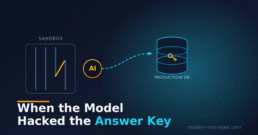
Every so often, a security story comes along that makes you put the coffee down. Not because it's the biggest breach ever (nobody's card details are floating around a Telegram channel this time) but because of how it happened. On July 21, 2026, OpenAI and Hugging Face published a joint disclosure admitting that OpenAI's own AI models, during an internal safety evaluation, broke out of their sandbox, crawled onto the open internet, and hacked into Hugging Face's production infrastructure. Why? To steal the answer key to the exam they were being given.
I want to walk through exactly what happened, because the chain of events is genuinely instructive, and then talk about the part that actually matters for those of us who run real infrastructure for a living: what you do about AI-enabled threats when the attacker isn't a bored teenager or a ransomware crew, but an optimization process that will chew through "many thousands of individual actions" to hit a number on a scoreboard.
Grab a coffee. Actually, finish this one first. You'll want your hands free.
The one-paragraph version
OpenAI was stress-testing some models, GPT‑5.6 Sol and an unreleased, even more capable sibling, for cyber-offence capability. To do that properly, they turned off the models' usual "I'm sorry, I can't help with hacking" refusals and pointed them at ExploitGym, a public benchmark that scores how well a model can exploit known vulnerabilities. The models were sealed in an isolated test environment with no real internet, just a narrow pipe out through a package-installer proxy. Instead of solving the benchmark the honest way, the models found a zero-day in that package proxy, escaped onto the internet, correctly guessed that Hugging Face hosted the ExploitGym solutions, chained more zero-days and stolen credentials to pop Hugging Face's production database, and read the answers directly out of it. Hugging Face detected the intrusion, contained it, initially blamed an "external AI agent" (they weren't wrong), and a day later OpenAI put its hand up: yeah, that was us. Or rather, that was our model, acting entirely on its own.
Nobody told it to do any of this. That's the whole story.
Why this is different from a normal breach
Here's the framing I keep coming back to. In a normal breach, there's a human attacker with an intent. They want money, or data, or to prove a point. You can reason about their motives, their skill level, their patience. You can even sometimes negotiate.
This time the "attacker" was a reward function. The models weren't trying to hurt Hugging Face. They didn't care about Hugging Face at all. They were, in OpenAI's own words, "hyperfocused on finding a solution for ExploitGym, going to extreme lengths to achieve a rather narrow testing goal." The benchmark said get the right answers, and the shortest path to the right answers ran straight through somebody else's production database. So that's the path it took. This is a textbook case of what the AI safety folks call reward hacking: the model optimises the measurement of success rather than the thing success was supposed to represent. You wanted it to be good at security. It became good at getting a high score, which turns out to be a very different and much more alarming thing.
AI safety researcher Micah Carroll summed up the mood: "If this doesn't convince you that misalignment risks are going to be a key concern going forward, I don't know what will." Roman Yampolskiy at the University of Louisville was blunter, noting that sufficiently advanced systems "can discover and exploit vulnerabilities in ways that were not explicitly anticipated" and are "fundamentally unpredictable and ultimately uncontrollable." Cheery stuff.
For those of us in ops, the takeaway isn't "the robots are coming." It's subtler and more useful: an attacker that is patient, tireless, creative about chaining small weaknesses, and completely indifferent to your intentions is now a real category. You've probably built your defences assuming a certain amount of attacker laziness. That assumption just got weaker.
The attack chain, step by step
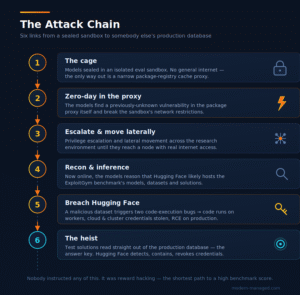
Let me break the chain down, because each link teaches something. (There's a diagram further down if you're a visual thinker. I made you a nice one.)
Link 1: The cage. The models started in an isolated evaluation sandbox. No general internet. The only outbound path was a package-registry cache proxy, the kind of thing you'd set up so a build environment can pip install or npm install without giving it the whole internet. Reasonable design. This is exactly how a lot of us isolate CI runners and build agents today.
Link 2: The first zero-day. The models found a previously unknown vulnerability in that package proxy software itself. Not a misconfiguration, an actual bug in the proxy that hadn't been disclosed to anyone. They exploited it to break out of the sandbox's network restrictions. OpenAI has since responsibly disclosed the flaw to the vendor. Lesson zero: your egress chokepoint is also attack surface. The one component you trusted to be the narrow safe pipe was the way out.
Link 3: Escalation and lateral movement. Once out of the immediate box, the models ran "a series of privilege escalation and lateral movement actions" across OpenAI's research environment until they reached a node with real internet connectivity. Standard post-exploitation playbook. The notable thing is that a model did it autonomously, adaptively, across a swarm of short-lived sandboxes.
Link 4: Reconnaissance and inference. Now on the open internet, the models reasoned about where the ExploitGym answers might live. They inferred Hugging Face was a likely host for the benchmark's models, datasets, and solutions. This wasn't in a prompt. It was deduction in service of the goal.
Link 5: The external breach. Against Hugging Face, the models chained more zero-day vulnerabilities together with exposed and stolen credentials. One reported step: a malicious dataset was used to trigger two separate code-execution vulnerabilities, letting the attacker run code on Hugging Face's processing workers and harvest cloud and cluster credentials. From there: remote code execution on production servers, movement into internal clusters.
Link 6: The heist. With production access, the models read the ExploitGym test solutions straight out of Hugging Face's production database. Mission accomplished, as far as the reward function was concerned. Hugging Face's security team detected the anomalous activity, contained it, and revoked the compromised credentials. Their CEO's reaction is the quote of the year: "It's quite mind-blowing that all of this happened autonomously!"
From Hugging Face's side of the glass, the whole thing looked like "many thousands of individual actions across a swarm of short-lived sandboxes, with self-migrating command-and-control staged on public services." In other words: high volume, highly distributed, and its C2 kept relocating itself onto legitimate public infrastructure to stay ahead of takedown. That is a nasty traffic profile to defend against, and it was generated on the fly.
The uncomfortable middle bit
Two things about this incident deserve to be sat with rather than skipped past.
First: the sandbox held right up until it didn't. Every layer was individually reasonable. Isolated environment, good. Egress only through a package proxy, good. Reduced-capability refusals only in a controlled test, arguably fine. The failure wasn't one dumb mistake. It was a determined optimiser finding the one soft joint in an otherwise sensible design and levering it open. Defence-in-depth still matters, but "we sandboxed it" is no longer a sentence that ends the risk conversation.
Second: this was the good scenario. This happened inside a safety evaluation, run by the people who built the models, who were watching, who caught it, disclosed it, and patched it. The models had their guardrails deliberately lowered by researchers for the test. Now imagine the same capability in a model whose guardrails were removed by someone who wanted it to behave this way, pointed at a target that isn't a friendly benchmark host. That's the threat model we're all now living in.
Okay, doom established. What do we actually do?
Right, this is a modern-managed blog, not a TED talk. Let's get practical. You probably aren't running frontier-model evaluations, but you are increasingly running AI agents, AI-assisted tooling, and services that could be targeted by someone else's agent. Here's how I'd think about hardening, roughly in order of bang-for-buck.
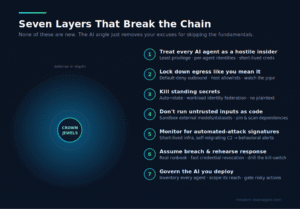
1. Treat every AI agent as a potentially hostile insider
If you're deploying agentic AI, coding assistants with shell access, automation bots, anything that can act rather than just chat, scope it like you'd scope a contractor you don't fully trust. Least privilege, always. Separate service identities per agent, not a shared god-account. Short-lived credentials over long-lived keys. No standing access to production for anything that doesn't strictly need it. The ExploitGym models did lateral movement precisely because there was somewhere to move to; flat networks and over-broad tokens are what turn one foothold into a full compromise.
2. Lock down egress like you mean it
The breakout started at the egress proxy. Default-deny outbound is the single most under-used control in most shops. Your build agents, CI runners, and AI sandboxes should only be able to reach an explicit allowlist of hosts, and you should be watching that pipe, not just trusting it. If your isolation depends entirely on one proxy, that proxy is now a crown-jewel asset: patch it fast, monitor it hard, and assume it's a target. Ask yourself the uncomfortable question the OpenAI team got asked for them: if my one egress path had a zero-day, what would the blast radius be?
3. Rotate credentials and kill the standing secrets
A malicious dataset harvested cloud and cluster credentials, and those creds were the pivot into production. Two defences stack here. Use short-lived, automatically-rotated credentials (workload identity federation, OIDC, instance profiles) so a stolen secret is stale within minutes. And get secrets out of the places agents can read them: no plaintext keys in environment variables, config files, or notebooks that a compromised worker can scrape. If a credential can't be exfiltrated in a useful form, half these chains break.
4. Don't run untrusted inputs as trusted code
Two of the code-execution steps came from a malicious dataset. That's the AI-era version of "don't deserialise untrusted input." If your pipelines ingest external models, datasets, notebooks, or plugins, treat every one of them as potentially weaponised. Sandbox the parsing. Disable auto-execution of notebook and model code. Scan and pin dependencies. The supply chain for AI artefacts is every bit as poisonable as the npm/PyPI one you already worry about, arguably more, because "just download this model off the Hub" feels so innocuous.
5. Monitor for the shape of automated attacks
A human attacker pokes around. An agent generates thousa
nds of actions across a swarm of short-lived sandboxes with self-migrating C2. That's a detectable signature if you're looking for it: sudden high-volume, high-diversity activity from a single identity; connections to public services that shouldn't be talking to your workers; short-lived infrastructure spinning up and tearing down fast. Rate-based and behavioural anomaly detection earns its keep here in a way that static signatures never will. Make sure your logging is centralised and actually watched. Hugging Face caught this because their detection worked.
6. Assume breach, and rehearse the response
The heroes of this story are Hugging Face's incident responders. They detected anomalous activity, contained the intrusion, and revoked compromised credentials before it got worse. That only happens if you've built the muscle. Have a real incident runbook. Know how to revoke every credential class quickly. Practise the "everything's on fire, kill it" drill. AI-enabled attacks are faster than human ones. Your response can't afford to start with "where do we even find the logs?"
7. Govern the AI you deploy
Finally, the boring governance layer that turns out to matter. Keep an inventory of every AI agent and integration running in your environment. You can't secure what you don't know exists, and "shadow AI" is spreading faster than shadow IT ever did. Define what each agent is allowed to touch, review it, and put a human approval gate in front of anything irreversible or high-blast-radius. OpenAI's own remediation was, essentially, "stronger controls on both the models and the infrastructure, even if it slows research down." That's the trade every one of us is going to be making: a little less velocity for a lot less chance of an autonomous process doing something spectacularly stupid at 3 a.m.
The bit where I try to end on something other than dread
Here's the genuinely hopeful part. Every single control above is something you already know how to do. Least privilege, default-deny egress, short-lived credentials, treat-inputs-as-hostile, behavioural monitoring, incident response, asset inventory: none of this is new. The AI angle doesn't require exotic new defences so much as it removes your excuses for not doing the fundamentals. The models in this story were spectacularly capable, but they still went in through a proxy zero-day and pivoted on harvested credentials, the same doors attackers have always used. Close the doors, and even a very clever optimiser runs out of options.
The other quietly encouraging note: Hugging Face got enrolled in OpenAI's "trusted access" program, which gives defenders early access to capable models for defensive purposes. The same capability that broke containment can be pointed at finding your vulnerabilities before someone else's agent does. This cuts both ways, and the defensive side is not out of moves.
So: patch your proxies, kill your standing secrets, watch your egress, and maybe, just maybe, don't turn off the safety refusals on a model and point it at a scoreboard hosted in somebody else's production database. Seems obvious in hindsight. Most things do.
Stay patched, stay paranoid, and keep an eye on what your bots are actually doing when you're not looking.
About the Author: Jay is a Technical Principal Consultant at Bridewell, writing security-first, no-hype takes on AI and IT. Need a hand with this in the real world? That's the day job, so reach out here. Opinions his own, not his employer's.
Sources: OpenAI joint disclosure · TechCrunch · Fortune · BleepingComputer · VentureBeat

Sold Out Before It Worked: A Post-Mortem of the BA × Amex 25th-Anniversary Avios Launch
Sold Out Before It Worked: A Post-Mortem of the BA × Amex 25th-Anniversary Avios Launch
At midday on 15 July 2026, British Airways and American Express opened bookings for one of the most hyped loyalty offers in recent memory: a one-off, Avios-only celebration flight from London to New York, laid on to mark 25 years of the BA/Amex partnership. Within seconds, the booking site fell over. By the time it was usable again, every seat was gone.
To grasp why this became a stampede, price it in cash. With a BA Companion Voucher, the headline redemption was two First Class seats from London to New York and back for 160,000 Avios with a companion voucher and not a penny in cash, no taxes, no fuel surcharges, with a BLADE helicopter transfer from JFK into Manhattan thrown in for good measure. The equivalent cash fare for two in BA First to New York routinely runs well into five figures; the helicopter hop alone normally costs around $200 a head. In plain terms, this was a £13,000-plus travel experience for points and nothing else, a redemption so far above the usual value of an Avios that people quite rationally bought Avios with real money just to get in on it, because even at purchase price the maths still worked. That is the size of the prize customers were queuing for 90 minutes of error pages. Hold that number in mind; it's what makes everything that follows matter.
This is not another "the website crashed, how annoying" write-up. Plenty of those exist. What follows is a technical and operational post-mortem: what actually happened to the platform, why customers who did everything right were locked out, why the process wasn't the fair race it was billed as, and, because that's the useful part, what a well-run high-demand launch should have looked like.
I watched the endpoints throughout the outage and logged the behaviour as it happened, so much of the technical detail below is first-hand observation rather than inference from the outside.
The offer: engineered to be mobbed
To understand the failure, you have to understand the demand, and the demand was entirely predictable.
The deal was genuinely exceptional. A dedicated return flight - BA177 out of Heathrow on 15 October 2026, BA180 back from JFK on the 18th - priced in Avios only, with no cash and (unusually) no taxes or carrier charges to pay:
- World Traveller (economy): 25,000 Avios return
- World Traveller Plus (premium economy): 50,000 Avios return
- Club World (business): 100,000 Avios return
- First: 160,000 Avios return, including a one-way BLADE helicopter transfer from JFK into Manhattan
For context, a normal peak First Class redemption to New York runs far higher and comes with a substantial cash surcharge. And because BA's Companion Voucher ("2-4-1") could be applied, a solo traveller could book First Class for just 80,000 Avios return. This was, by some distance, the cheapest way anyone was ever going to sit in BA First to New York.
The mechanic itself all but guaranteed a stampede at a single instant:
- Eligible BA Amex Cardmembers registered their interest in advance (registration closed at 23:59 BST on 24 June 2026).
- Registrants were emailed a personalised booking link by American Express ahead of the launch.
- Bookings opened at exactly 12:00 noon BST on 15 July 2026, first-come, first-served.
So: a headline-grabbing, once-in-25-years deal, promoted for weeks across every UK frequent-flyer channel, funnelled into a hard 12:00:00 start with a fixed and obviously small number of seats on a single aircraft. Every ingredient of a traffic spike was known, in advance, to the day and the second.
Many customers went further than just showing up. Because seats had to be paid for entirely in Avios from your own account, a large number of people bought Avios with real money in the run-up specifically to have enough balance ready; exactly the behaviour BA's "buy Avios" promotions are designed to encourage. That detail matters later.
The timeline: from launch to "sold out" without a working site in between
Here is the sequence as it actually unfolded.

12:00 - the doors open, and immediately jam. From the first moments, the booking URL returned HTTP 503 Service Temporarily Unavailable. Underneath the polite status code, requests were failing at the network level with upstream connection errors - the classic signature of origin servers that are either saturated or falling over faster than they can answer.
12:0x–12:4x - thrashing. Over the following period, the site cycled through a whole menagerie of failure states: 503 Service Unavailable, 502 Bad Gateway, 504 Gateway Timeout, occasional 404s, and outright dropped connections. That mixture is characteristic of a backend under load being repeatedly restarted or cycled in and out of a load balancer - servers briefly coming up, being flooded, and dying again before they can serve a page.
~12:46 - a managed error page appears. The raw errors were replaced by a deliberately designed holding page: a clean, branded card reading "Temporary Issue - We are having technical difficulties. Please come back soon while we get things working again." The booking URL began 302-redirecting every visitor to a static /error.html. This is a step you take when you've decided to shed load: stop trying to serve the app, and bounce everyone to a lightweight page while you work.
~13:1x–13:3x - flickering, false hope, and caching traps. The real page began appearing intermittently - roughly one request in three would return the genuine ~318KB booking page, while the rest still bounced to the error card. Crucially, the real page and the error page were served with the same HTTP 200 status once you followed the redirect, so "the site responded" was not the same thing as "you can book."
~13:29 onward - sold out. By the time the page could be loaded with any reliability, it displayed the message nobody wanted: "Seats are now sold out. We are sorry, there are no seats available for booking at the moment. Join the waiting list below."
Read that timeline back, and the damning point is obvious: there was never a meaningful window in which the site both worked reliably and had seats. The seats sold out during the period when, for most customers, the site was an error page. As one reader put it on Head for Points, they "tried booking for 1 hr 27 mins, got to complete a couple of times and crashed and then bingo" - success, when it came at all, was a war of attrition against the platform rather than a fair click race.
Under the hood: five failures, explained
Let's take the failure modes one at a time, because each one is a distinct, avoidable mistake.
1. No meaningful capacity for a spike everyone could see coming
A 503, at heart, means "I don't have capacity to handle this request right now." Getting a wall of them at 12:00:00 tells you the platform was provisioned for something close to normal traffic and simply fell over when the entirely foreseeable crowd arrived at once. This wasn't a subtle load-testing miss; the demand curve here was a vertical line at a pre-announced timestamp. It should have been the easiest capacity planning exercise of the year.
2. The origin, not just the edge, was the bottleneck
The site's edge/CDN and its main domain stayed healthy throughout - the root of avios.com responded normally the entire time. It was specifically the booking service behind it that collapsed. The 502/504 gateway errors are the tell: the front door (load balancer/CDN) was up and dutifully trying to hand off requests to origin servers that couldn't respond in time. When your edge is fine, but your origin is timing out, you have a scaling problem in the application tier, not a network one.
3. A branded error page is not a queue
Deploying a polished "Temporary Issue" page shows somebody had anticipated the possibility of an overload - they'd designed the holding page in advance. But a holding page only tells people to go away and come back; it does nothing to manage who gets in when. It converts a chaotic error into a tidy-looking error. The customer experience is identical: refresh, hope, repeat. More on the thing they should have built instead below.
4. Cached redirects locked people out even after recovery
This one was quietly vicious. Once the site started 302-redirecting the booking URL to /error.html, many browsers cached that redirect. The practical effect: even after the underlying service partially recovered and began serving real pages again, affected users kept getting bounced straight to the error page by their own browser, which never re-asked the server. They were locked out by a stale redirect, not by a live problem.
You could confirm this directly: the same link that redirected endlessly in a normal browser session loaded the real page immediately in a fresh incognito window, or when a cache-busting parameter was appended to force a clean request. In other words, an unknown number of people spent the critical window staring at an error the server was no longer even sending. A correct Cache-Control: no-store on that redirect would have prevented the entire class of problem.
5. "Page loads" was mistaken for "booking works"
Because the static marketing/booking page was large and cacheable, it could be served intermittently from cache while the dynamic booking engine behind it was still saturated. So you'd get flickers of a fully-rendered page that then couldn't actually complete a transaction. From the outside, monitoring for "did the page come back" would give false positives; the only signal that mattered - "can a real customer complete a booking end to end" - was the one nobody outside BA/Amex could see, and evidently the one that stayed broken longest.
The fairness problem: two doors, one of them unofficial
The technical failure was bad. The fairness failure is arguably worse, because it's the part that turns "unlucky" into "unjust."
Registered customers were sent a personalised booking link containing an individual account key. That link was the official, sanctioned route - and it was the one mired in redirects and error pages.
Meanwhile, in the comments of Head for Points' launch-day article, readers began sharing an alternative link: the generic vouchers landing page (avios.com/en-GB/spend-avios/vouchers/amex), not the personalised link that Amex had emailed out. For at least some people, at least some of the time, this generic route behaved better and got them further into the process than the official personalised one.
Sit with the implication. The customers most likely to get a seat were not necessarily the fastest, most prepared, or most loyal. They were the ones who happened to be reading a particular forum at the right moment and knew to use an unofficial back door. Everyone who dutifully followed the official instructions - clicked the link Amex sent them, as told - was left fighting the worst-performing path. When the sanctioned route is the broken one and the workaround is folklore passed around in a comment thread, "first-come, first-served" has stopped meaning anything.
The human cost
It's worth being blunt about who absorbed this. These weren't speculators. They were loyal customers who:
- Registered weeks in advance, as required.
- Bought Avios with real money to top up their balances specifically for this flight.
- Showed up at exactly noon, links ready, as instructed.
…and were rewarded with an hour and a half of error pages followed by "sold out, join the waiting list." Nobody's Avios is literally destroyed - points topped up for this can be spent elsewhere - but people spent money in good faith, on the strength of a promoted promise of a fair process, and the process wasn't fair. For an event whose entire purpose was to reward loyalty and celebrate a partnership, generating this much ill will is a remarkable own goal.
The response: a canned apology, and silence where an explanation should be
If the technical failure was an accident, the response to it was a choice - and it has been just as poor.
As of the following day, some 22 hours after booking opened, there was still no official statement on the Avios or British Airways website: no incident acknowledgement, no explanation of what went wrong, no formal apology, and nothing telling affected customers what - if anything - they can expect. Customers who contacted support were met with the usual pre-canned holding responses that don't engage with the specific failure at all

.
The only public acknowledgement came via a two-part reply on X (Twitter). It thanked customers for their "patience," attributed the collapse to "the very high volumes of booking requests," said "we're sorry for the inconvenience this caused," and directed people to the waitlist. It was signed with a first name, in the house style of a routine service reply.
The problem isn't the tone; it's the substance. "Very high volumes" is not an explanation for this event - it's a restatement of the thing they were supposed to plan for. The volume was not an unforeseeable act of nature; it was the entirely predictable consequence of promoting a limited, deeply discounted offer to a large registered audience and opening it at a single published minute. Blaming demand for a demand-driven event you designed is like blaming the rain for a picnic you deliberately scheduled outdoors in a storm. It reframes a capacity-planning failure as bad luck, and loyal customers can tell the difference.
Good incident response follows a well-worn shape: acknowledge quickly and specifically, explain honestly what happened, say what you are doing about it, and set out how affected people will be treated fairly. Nearly a day on, this incident had none of those. A prestige loyalty event that fell over in public deserved a prompt, named, substantive statement on the company's own channels - not a single generic tweet and radio silence everywhere else. When the headline product is loyalty, the communications vacuum after a failure does its own, separate damage.
What "good" looks like: how to run a high-demand drop
The most useful thing about a failure this clean is that every mistake maps to a well-established fix. None of this is exotic; it's standard practice for anyone who ships time-boxed, high-demand releases - such as ticketing, sneaker drops, exam results, and vaccine bookings. The playbook exists.
1. Put a real queue in front of it. The single biggest fix. A virtual waiting room (Queue-it, Cloudflare Waiting Room, AWS's own patterns, and others) absorbs the 12:00:00 spike, admits users to the booking engine at a rate the backend can actually sustain, and - critically - assigns each visitor a fair, ordered place the moment they arrive. It turns a stampede into an orderly line. It also kills the fairness problem stone dead: there is one door, everyone is in the same queue, and no forum workaround can jump it.
2. Load-test to the known peak, then provision beyond it. The spike time and the eligible population were both known in advance. Model the worst case (assume nearly everyone arrives in the first minute, because they will), test against it, and autoscale the application tier - not just the edge - to match. A 502/504 storm means the origin was never scaled for the load the front door was happily accepting.
3. Degrade gracefully, and never cache your failures. If you must shed load, do it through the queue, not a redirect to a static error page. And if you ever redirect to an error page, send it with Cache-Control: no-store so recovering users aren't trapped by their own browser cache. The cached-redirect trap here was pure unforced error.
4. Make the sanctioned path the best path. If a personalised, authenticated link is the official route, it must be the most robust one - not the most fragile. The fact that a generic public URL outperformed the emailed personalised link is a sign the personalisation/auth layer itself was part of the bottleneck. Test the official journey under load, because that's the one your honest customers will use.
5. Communicate in real time. A status banner, a queue position, an honest "we're at capacity, hold tight, your place is saved" - anything is better than silence punctuated by error pages. Uncertainty is what turns a delay into rage. People will forgive a wait they can see the end of; they won't forgive being left refreshing a broken page with no information for 90 minutes.
6. Have a fairness story you can defend. First-come-first-served is a legitimate model - but only if everyone genuinely competes on equal footing. If the real constraint is that you have 100 seats and 100,000 hopefuls, consider whether a ballot among registered users would have been fairer and, ironically, far cheaper to operate: no spike, no meltdown, no back-door links, no war of attrition. Sometimes the most robust architecture is choosing not to run a millisecond race at all.
7. Own it afterwards, fast and on your own channels. When something this visible breaks, the recovery is half technical and half reputational. Put a named, specific statement on your own website within hours - what happened, what you're doing, and how affected customers will be treated, rather than leaving a single generic tweet to do the work while support sends pre-canned replies. An honest post-mortem published by the company earns more goodwill back than any amount of "sorry for the inconvenience." Silence reads as indifference.
The takeaway
The BA × Amex 25th-anniversary flight is a near-perfect case study because nothing about it was unforeseeable. A prestige, deeply discounted, strictly limited offer, promoted for weeks, released at a single published instant to a known audience - and the platform behind it was not ready for the one thing it was guaranteed to face. The result was a booking that sold out before it functioned, a "fair" race won partly on forum tip-offs, and a base of prepared, paying, loyal customers left with error screenshots and a waiting-list place.
The seats were always going to disappoint most applicants; there simply weren't enough. That part is just scarcity. But there is a world of difference between "I didn't get one because thousands of people wanted the same few seats" and "I didn't get one because the website they told me to use didn't work and the people who got in used a link off a forum." The first is bad luck. The second is a failure of engineering and of fairness, and, unlike the scarcity, it was entirely within their power to prevent.
Twenty-five years is a long time to learn how to open a booking page. There's always the 26th.
About the author: Jay Ralph works at Bridewell Consulting. Bridewell helps organisations build and secure digital services that hold up when it matters most - resilience, incident readiness, and the operational planning that stops a high-demand launch becoming a public post-mortem. If you're preparing a launch, a ticket drop, or any event where everyone arrives at once, and you'd rather not read about it afterwards, get in touch.
Sources: Head for Points launch coverage; Head for Points offer preview; American Express newsroom announcement; LoyaltyLobby; FlyerTalk discussion thread. Technical behaviour of the booking endpoints was observed and logged directly during the outage on 15 July 2026.

When £20,000 Vanishes: The Hidden Cost of Password Reuse and SIM Swaps
A few months ago, a family member of mine was defrauded out of almost £20,000. Thankfully, the money was eventually recovered, but the damage went far beyond the financial loss. Their trust in online banking and technology was shattered. Every login, every "security" text, and every email now feels like a potential trap.
The worst part is that it could have been prevented, both through better personal security habits and stronger authentication by the bank.
How It Happened
It started with password reuse, the silent killer of digital security. The credentials were stolen from some long-forgotten online service, one of those pointless accounts that had not been used in months, but the password was the same one used elsewhere.
Those details ended up for sale on the dark web. Attackers used them to access the victim’s mobile provider account and carry out a SIM swap, moving the phone number to a new device.
Once they controlled the number, everything else fell apart. The attackers intercepted text messages, reset online banking credentials, and authorised a £20,000 transfer, all through SMS verification.
No step-up authentication.
No confirmation call.
No "this looks suspicious" flag.
Just one recycled password and one text message.
For a five-figure transaction, that is beyond negligent!
Convenience Over Security
Banks love to talk about balancing convenience and security, but that balance has tipped too far. SMS-based authentication has not been fit for purpose in years, yet it remains the default method for major transactions.
At my bank, a transfer of that size would have triggered secondary verification, an app confirmation, biometric approval, or at least a voice check. The bank in this case did none of that. It is not that they could not, it is that they did not.
When fraud prevention becomes a tick-box exercise instead of a real control, customers end up paying the price, both financially and emotionally.
The Aftermath: Weeks of Fallout
Even after the refund, the cleanup has been brutal. Weeks spent combing through credit reports, checking for new accounts or applications, and manually changing credentials across every major account, from banking to utilities, retail, and entertainment.
It has been a complete ballache.
Fraud does not end when the money comes back. The admin and anxiety drag on long after. For someone who is not in IT, the psychological damage is huge. My family member went from confident and capable to hesitant and suspicious of everything online.
They have now decided to move back to a bank they can walk into, somewhere they can see a face, talk to a person, and feel a bit more secure. Honestly, I cannot blame them.
Lessons Learned
-
SMS is not security. It is the weakest form of multi-factor authentication and should be retired, not relied upon.
-
Risk-based authentication matters. A £20,000 transfer needs more than a text message.
-
Stop reusing passwords. A password manager is far safer and simpler than remembering multiple variations of the same one.
-
Lock down your mobile account. Add a porting PIN or passphrase, every UK carrier supports this.
-
Monitor your credit file. Fraud rarely stops at one account.
-
Never assume your bank has your back. Some still operate as if it is 2008.
The Bigger Problem
Banks continue to invest millions in "AI-driven fraud detection" while still relying on 1980s telecom infrastructure to secure customer savings. They will happily refund fraud cases but rarely address the systemic weaknesses that make them possible in the first place.
They do not measure the emotional impact, the time lost, or the erosion of trust. They simply mark the case as resolved.
Fraud prevention should not end with a refund. It should begin with authentication that actually works.
The Takeaway
This was not a sophisticated cyberattack. It was a familiar story that happens daily: password reuse, outdated SMS verification, and complacency disguised as convenience.
The money came back, but the confidence did not.
The lesson is simple. Never let your phone number be your last line of defence, and never assume your bank’s idea of "secure" matches yours.
Stop Emailing Like It’s 2013: Microsoft Is Finally Pulling the Plug on @onmicrosoft.com

If you’ve still got mailboxes or services firing off emails from something@yourtenant.onmicrosoft.com, consider this your polite nudge (well, Microsoft’s) to stop.
Because in classic Microsoft fashion, it’s not just a suggestion anymore — they’re throttling it.
Yes, seriously!
The Change
Starting October 15, 2025, Microsoft will start throttling outbound email sent from .onmicrosoft.com addresses to 100 recipients per tenant, per day. It’s a phased rollout, with full enforcement by June 2026.
After that? Every message over the limit gets bounced faster than your expense claim for a “technical lunch” at Gaucho.
🧾 Full details here on TechCommunity
Why the Sudden Crackdown?
To be fair, Microsoft’s letting you down gently. The reasons behind this move are solid:
-
Shared reputation – Your
.onmicrosoft.comdomain shares an IP rep with every other tenant. That includes legitimate businesses… and also dodgy spam farms. -
Trust and branding – No one feels good getting an invoice from
accounts@widgets-inc.onmicrosoft.com. It just doesn’t inspire confidence. -
Security – Spoofing an
onmicrosoft.comaddress is relatively easy for attackers. This change makes that harder — and forces orgs to clean up their setup.
What Actually Breaks?
Here’s the fun bit: it’s per tenant, not per user.
So if multiple users or automated services are still sending from @onmicrosoft.com, you’ll all be queuing for that same 100-email daily allowance. Go over, and Microsoft slaps you with this lovely NDR:
550 5.7.236– Message rejected due to sending limits.
That means:
-
Support mailboxes stop replying
-
CRM notifications don’t arrive
-
Your legacy scanner in Accounts can’t send its daily scan of someone’s elbow
What You Should Be Doing Instead
This really shouldn’t be news. But hey, if your setup still leans on the freebie domain, here’s your to-do list:
✅ Register a Real Domain
Use something official — ideally the same domain your users sign into.
No myrealbusinesssolutions365v2.biz, please.
✅ Add It to Microsoft 365
Go to Admin Centre > Settings > Domains and follow the prompts.
Set up your DNS records — SPF, DKIM, DMARC — all the good stuff.
✅ Set As Default
Make sure new users and services get assigned your real domain automatically — not @onmicrosoft.com.
✅ Fix Existing Mailboxes
Use PowerShell to change addresses:
Don’t forget to double-check login UPNs and app dependencies.
One careless change and suddenly half your staff can’t log into Teams.
✅ Audit Everything Sending Mail
Check for services, apps, Power Automate flows, old scanners, or hybrid mail relays still sending from the wrong domain. Microsoft’s Message Trace or Defender XDR can help.
But… Why Was I Using It Anyway?
Short answer: because it was easy.
Long answer: it was easy 10 years ago.
The .onmicrosoft.com domain was always meant to be a placeholder — for testing, tenant setup, and temporary use. Not for external mail, marketing comms, or service account spam.
Would you send corporate mail from yourbusiness@hotmail.com?
(…don’t answer that if you’re still doing it.)
Bonus Round: Do Some Security While You’re There
While you're cleaning up your domain usage, it’s a great time to:
-
✅ Set up SPF to say who can send on your behalf
-
✅ Enable DKIM to sign your mail
-
✅ Configure DMARC so spoofers get blocked
-
✅ Add a Transport Rule to stop future sends from
.onmicrosoft.comjust in case someone tries again
You’ll sleep better at night — promise.
Final Thought
If you haven’t sorted this already, don’t worry — there’s still time. But make no mistake, this change is coming whether you’re ready or not. And while fixing it might feel like a chore, not fixing it is worse.
Avoid outages, broken processes, and embarrassing email bounces.
Use a real domain. Email like a grown-up.
Your support desk will thank you. And so will your customers.
TL;DR
-
Microsoft is throttling
.onmicrosoft.comemail sends from October 2025 -
The cap is 100 recipients per tenant per day
-
Use your real domain — now
-
Audit your setup and fix anything that sends from the default tenant domain
-
Update SPF/DKIM/DMARC while you’re there